





Introduction
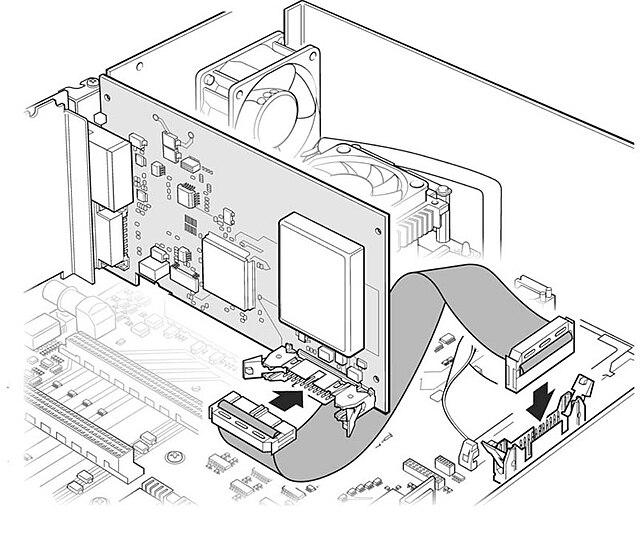
Technical illustrations are vital components of user manuals, service guides, and technical documentation. These visuals communicate complex information quickly and clearly, making it easier for users to understand assembly instructions, product features, or troubleshooting steps. Because of the specialized nature of technical illustration work, pricing can vary widely depending on several key factors. This guide explores everything you need to know about technical illustration pricing for manuals, helping businesses and illustrators set realistic budgets and expectations.
What Affects Technical Illustration Pricing for Manuals?
1. Type of Manual
Different manuals require different illustration styles and detail levels. For example:
- User Manuals: Typically include simple diagrams, labeled parts, and procedural steps.
- Service Manuals: Often require complex cutaways or exploded views.
- Installation Guides: May include step-by-step sequences with arrows and multiple angles.
2. Complexity of Illustrations
The more intricate the design, the higher the cost. Illustrations range from basic line art to full-color, photo-realistic 3D renders.
3. Number of Illustrations Needed
Larger manuals with dozens or hundreds of illustrations naturally incur higher costs.
4. Level of Detail and Accuracy
Precise, technical accuracy (especially in engineering and manufacturing contexts) takes more time and specialized skills.
5. Source Material Availability
If you can provide CAD files, reference photos, or sketches, it reduces the illustrator’s workload. Without these, prices increase to account for additional design and research time.
Real-World Scenario: “I once worked on a manual for a complex industrial machine where the client provided only blurry phone photos. This required significant reverse-engineering and additional time, ultimately increasing the project cost by 30% compared to a similar project where detailed CAD files were supplied upfront.”
6. Turnaround Time
Urgent projects often require rush fees or overtime charges.
7. Revisions and Collaboration
Multiple rounds of feedback or ongoing consultation during development can add to overall costs.
Illustrator Insight: “A common challenge arises when feedback isn’t consolidated. I’ve found that clients who designate a single point of contact for revisions, and gather all departmental input before sending it, can cut revision rounds in half, saving both time and money.”
Common Pricing Models
1. Hourly Rate
Rates generally range from $40 to $150 per hour, depending on the illustrator’s experience and location. This model works best for:
- Short-term projects
- Clients with uncertain scope or ongoing needs
Illustrator Perspective: “My hourly rate isn’t just about the drawing time; it factors in the deep dive into engineering specs and ensuring every bolt is depicted correctly.”
2. Per Illustration Pricing
Each illustration is priced individually based on complexity. For example:
- Simple line drawing: $25–$100
- Moderate detail: $100–$300
- High-detail or 3D rendering: $300–$1,000+
3. Flat Rate Projects
A fixed price is negotiated for the entire manual. This model is ideal for:
- Projects with clearly defined scopes
- Clients wanting budget predictability
4. Retainer or Long-Term Contracts
This model offers discounted rates in exchange for consistent work. It’s commonly used by manufacturers who regularly update or produce new manuals.
Average Cost Ranges
| Illustration Type | Estimated Cost Range |
|---|---|
| Simple Line Art | $25 – $100 per piece |
| Medium Complexity Diagrams | $100 – $300 per piece |
| High-Detail 3D Exploded Views | $300 – $1,000+ per piece |
| Full Technical Manual Package | $1,000 – $10,000+ |
Prices may vary based on industry, urgency, and specific client requirements.
Cost-Saving Tips for Clients
- Provide Complete Reference Materials: CAD files, dimensions, and sketches help speed up the process.
- Consolidate Feedback: Reducing revision cycles saves time and money.
- Use Style Guides: A standardized style improves consistency and lowers editing needs.
- Plan Ahead: Avoid rush fees by allowing adequate time for production.
- Bundle Projects: Larger projects often qualify for volume discounts.
Client Tip: “Clients often underestimate the time required for accurate technical illustration. To mitigate this, consider breaking down complex manuals into phases or discussing incremental deliveries with your illustrator.”
How to Choose the Right Illustrator
- Portfolio and Experience: Look for illustrators who specialize in technical drawings for your industry.
- Knowledge of Standards: Familiarity with ISO, ANSI, or other industry norms is essential.
Expert Insight: “Familiarity with ISO (International Organization for Standardization) or ANSI (American National Standards Institute) standards ensures that symbols, line weights, and projection methods used in the illustrations are globally recognized and contribute to universal clarity, especially important for products with international markets.” - Software Proficiency: Tools like Adobe Illustrator (for vector scalability), AutoCAD, and SolidWorks (for direct CAD integration) streamline production and ensure high-quality results.
- Types of Projections Used: Common methods include isometric, orthographic, and oblique projections—each suited for different manual types and levels of detail.
- Communication Skills: A good illustrator is also a good collaborator.
Conclusion
Technical illustration pricing for manuals depends on various factors such as complexity, quantity, and timeline. While the costs can range widely, understanding the pricing models and influencing factors allows both clients and illustrators to plan and budget effectively. Ultimately, investing in high-quality technical illustrations improves user experience and reduces support costs.
FAQs
Q1: How are rush fees handled?
A: Most professional illustrators charge an additional 20–50% for expedited delivery, depending on project scope and current workload. Always confirm timelines and associated costs in the contract.
Q2: Are there differences in pricing between digital and print manuals?
A: The illustration cost remains largely the same, but print manuals may incur additional fees for layout formatting, bleed setup, and resolution adjustments. Be clear whether illustrations need to meet CMYK print standards or just digital formats.
Q3: What licensing or usage rights are included in pricing?
A: Usage rights vary. Some illustrators retain copyright and license the image for specific uses (e.g., one-time use, non-commercial, etc.), while others offer full ownership for an additional fee. Clarify this upfront in your agreement.
Q4: Can I edit the illustrations after delivery?
A: You may be able to if the illustrator provides editable source files (e.g., .AI, .PSD, .DWG). However, this may come at a premium, and licensing terms must allow for modification. Always check the contract or discuss this during onboarding.
Q5: How many revision rounds are typically included?
A: Standard practice includes 1–3 revision rounds. Excessive changes, especially beyond the original scope, may incur extra charges. To avoid this, consolidate team feedback before each round.